Software for gaming centres, internet cafés and console rooms
Every PC is locked until your cashier starts a session or a member logs in. Netcraft counts the time, adds drinks and snacks to the same bill, and gives you the day's sales from opening to closing.
A day at the counter
How Netcraft fits a normal day in a gaming centre, from opening to closing.
Opening
PCs come up locked on the Netcraft screen. Your opening time starts the day in the reports, so late-night shifts stay in one working day.
Walk-ins
The cashier starts a PC with a time limit or open time. The price comes from the PC group, such as Normal or VIP, and time can be added without stopping.
Regulars
Members log in with their nickname and password and play from prepaid balance or hours. Unused hours stay on the account.
The café
Drinks and snacks go on the player's bill. Players can order from their PC and the cashier confirms. Stock goes down when the bill is paid.
Consoles and tables
Consoles and billiard tables without a PC get their own timers and bills at the same counter.
Closing
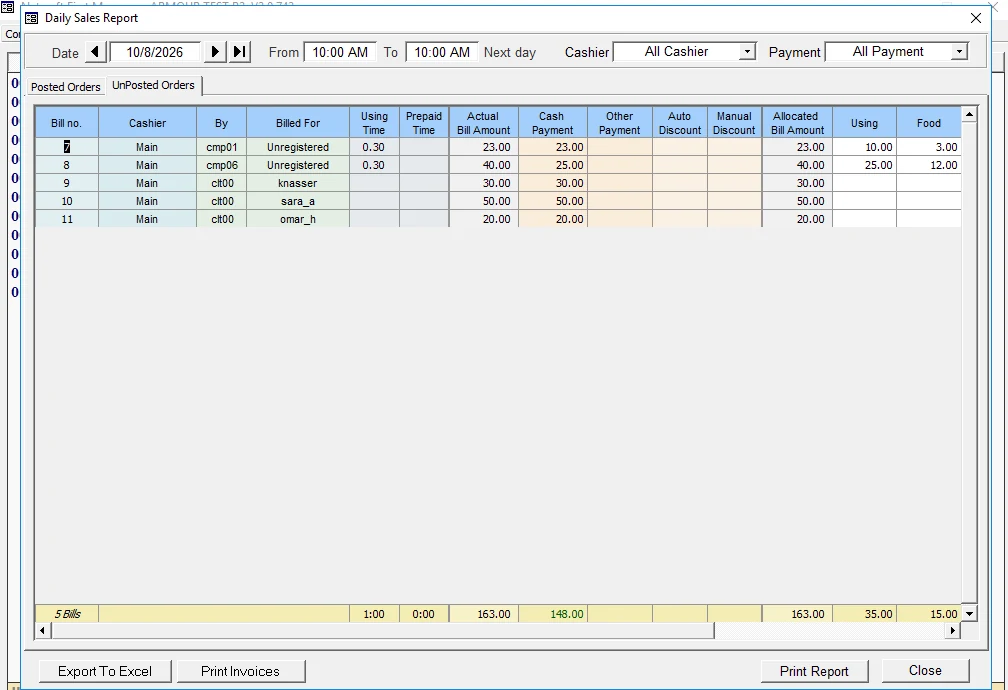
The daily report lists every bill, the cashier who took it and how it was paid. Print it or export it to Excel.
Members and regulars
Member accounts
Players log in on any PC with their nickname and password and play from their own balance.
Prepaid hours
Sell hours or balance at the counter. Unused hours stay on the account for next time.
Prepaid codes
Print time codes to sell or give away. A code can expire after a number of days.
Reward points
Members earn points when they buy prepaid hours, and spend them on free time.
For the owner
Your working day
Reports run from your opening time to the same time next day, so late nights stay in one day.
Every bill has a name
Each bill shows which cashier took it and how it was paid. Filter the day by cashier or payment type.
Staff rights
Decide what each cashier can do: discounts, deleting items, reports, settings.
Locked-down PCs
Block USB drives, Task Manager and programs you don't allow on the players' PCs.
See every screen
The Features page shows the real program with demo data: the Computers page, bills and payments, members, settings, the daily report and the player's screen.
Questions from gaming centres
Can members play from a balance?
Yes. Sell prepaid hours or balance at the counter. The member logs in on a PC with a nickname and password, and the time comes off the balance.
Can I have different prices for VIP PCs?
Yes. Each PC group has its own price per hour, minimum charge and rules.
Can players order drinks from their PC?
Yes. The order appears at the counter, the cashier confirms it, and it goes on the player's bill.
Do I need internet?
No. Netcraft runs on your server and local network, so the centre keeps working when the internet is down.
Can you install it without visiting?
Yes. We install remotely and stay on the line while your staff set up each PC.
Tell us about your place
We'll reply on WhatsApp with a quote for your centre. Your answers go into a message that you send yourself. This site doesn't keep them.
Or contact us directly